Unordered List

Play PES 2015 Online with your friends

Play PES2015 online and challenge your friends on PS4

Start your blog easily in few clicks

Create a professional blog without any experience and start making money

Get paid iPhone apps for free, Legally!

App trackers allow you to legally track changes in price for many, if not most, apps available on the iTunes App Store

Install Kali Linux in dual boot with Windows

Learn how to have Kali Linux installed in dual boot with your Windows and take profit of the distibution functionalities

Youtube: FIVE Tips and tricks for the fatest use

If you think you know everything about YouTube, Check out these Fast Five tricks...

Showing posts with label internet. Show all posts

Know the Most Common Ways to Hack a Facebook Password and How to Protect Yourself from Them


 We use Facebook as a tool to connect, but there are those people who use that connectivity for malicious purposes even if it's one of the most secure applications on the Internet. People can practically steal our identities and that's just with the visible information we purposely give away through our public Facebook profile.

 In this post I'll show you the most common ways that hackers use to hack into someone's Facebook account. I'll also show you how to prevent it from happening to you.


Know the Most Common Ways to Hack a Facebook Password and How to Protect Yourself from Them


 Method 1: The easiest way to "hack" into someone's Facebook is through resetting the password. This could be easier done by people who are friends with the person they're trying to hack.

 
Know the Most Common Ways to Hack a Facebook Password and How to Protect Yourself from Them

 How to Protect Yourself:
 - Use an email address specifically for your Facebook and don't put that email address on your profile.
 - When choosing a security question and answer, make it difficult. Make it so that no one can figure it out by simply going through your Facebook. No pet names, no anniversaries, not even third grade teacher's names. It's as easy as looking through a yearbook.
 - Learn about recovering your account from friends. You can select three friends you want the password sent to. That way you can protect yourself from a friend and other mutual friends ganging up on you to get into your account.
 Read:  How to recover your personal data on Facebook

 Method 2: Use a Software Keylogger. It's a program that can record each stroke on the keyboard that the user makes, most often without their knowledge. The software has to be downloaded manually on the victim's computer.

Know the Most Common Ways to Hack a Facebook Password and How to Protect Yourself from Them


 How to Protect Yourself:
 - Use a firewall. Keyloggers usually send information through the internet, so a firewall will monitor your computer's online activity and sniff out anything suspicious.
 - Install a password manager. Keyloggers can't steal what you don't type. Password mangers automatically fill out important forms without you having to type anything in.
 - Update your software. Once a company knows of any exploits in their software, they work on an update. Stay behind and you could be susceptible.
 - Change passwords. If you still don't feel protected, you can change your password bi-weekly. It may seem drastic, but it renders any information a hacker stole useless.

 Method 3: Phishing. This option is the most common method to hack someone's account. The most popular type of phishing involves creating a fake login page. The page can be sent via email to the victim and will look exactly like the Facebook login page. If the victim logs in, the information will be sent to the hacker instead of to Facebook.

Know the Most Common Ways to Hack a Facebook Password and How to Protect Yourself from Them


 How to Protect Yourself:
 - Don't click on links through email. If an email tells you to login to Facebook through a link, be wary. First check the URL. If you're still doubtful, go directly to the main website and login the way you usually do.
 - Phishing isn't only done through email. It can be any link on any website, chat room, text message etc. Even ads that pop up can be malicious. Don't click on any sketchy looking links that ask for your information.
 - Use anti-virus & web security software, like Avast. Read How to Install Avast AntiVirus with a Free Registration.


 Method 4: Stealing Cookies. These cookies allow a website to store information on a user's hard drive and later retrieve it. They contain important information used to track a session that a hackers can sniff out and steal if they are on the same Wi-Fi network as the victim.

Know the Most Common Ways to Hack a Facebook Password and How to Protect Yourself from Them


 How to Protect Yourself:
 - On Facebook, go to your Account Settings and check under Security. Make sure Secure Browsing is enabled. Hackers can't sniff out cookies over encrypted connections like HTTPS, so try to steer away from HTTP.
 - Full time SSL. Use Firefox add-ons such as HTTPS-Everywhere or Force-TLS.
 - Log off a website when you're done.
 - Use only trustworthy Wi-Fi networks. A hacker can be sitting across from you at Starbucks and looking through your email without you knowing it.
 - Use a VPN. These protect against any sidejacking from the same WiFi network, no matter what website you're on as all your network traffic will be encrypted all the way to your VPN provider.

 Share the post and help your friends to protect their accounts ;)

 Informations collected from WonderHowTo

How to Create a High Quality Blog Using Blogger (FULL-COMPLETE TUTORIAL)


 Before you proceed into the opening of your blog, it is important to think on what you will talk and why you want to blog? You need to properly frame your approach, otherwise, you will go in all directions and stop quickly.

 The purpose of a blog was never, in a logic, for making money with advertissements or promoting your services. If this should happen, it will happen naturally due to the quality of your articles and the automatic display and contextual of advertisements, your references, and your works for sale next to each article.


How to Create High Quality Blog website Blogger blogspot (FULL TUTORIAL)

 Blogger is an online service acquired by Google for creating a blog fully managed by one or more users. This service has become the preferred choice for any novice bloggers for its simplicity, reliability, flexibility, and especially for its gratuitousness. It's a simple tool, benefiting from automatic referencing by Google, allowing very quick SEO to your blog. In other words, your blog is more likely to appear soon in the first links of research when keywords of your own business are typed in Google search.
 The edition of the blog is always organized in the same way: A homepage containing articles, and
pages that can appear either in tabs at the top of the blog or on the border, according to your choice.
 The blog menu: tabs (these are the pages)
 The right side: "Widget" allows you, for example:
 o Set a translator of your blog
 o Links to other sites
 o A Search field
 o Visitors Statistics
 o A calendar...

 How to create the blog:

 You must first create an account on Google. Open google.com. At top right, a blue button ''Sign in'' click it then choose ''Create Account''.

How to Create High Quality Blog Web Site Blogger Google Home Page

How to Create High Quality Blog Web Site Blogger Google Home Page
 Fill in the required fields.
 By creating a Google account, you can access all Google tools: mailbox yourmail@gmail.com, access to Blogger to create a blog, Google +, Google DRIVE (which allows you to share documents online).

 - Now go to Blogger.com, log in using your Google account, confirm your profile when asked then clic ''New Blog'':

How to Create High Quality Blog Web Site Blogger Google Home Page

 - You'll be asked for a blog title. This title will appear in the header of your blog. You can change it at any moment. Below, an address is required.It's : The URL of your blog (internet address) or the "domain name" of your blog.
 Once chosen, it may not be changed. For example : Http://yournewblog1.blogspot.com/
 The chosen domain name suffix is yournewblog1
 Blogspot.com means you are hosted for free by "blogspot" until you decide to change your hosting provider, i'll show you how to get a custom domain name yournewblog1.com later.

 - You can choose what you want in the domain address, and enter it in the field: Address. The
domain name can take different forms:
 yournewblog1
 your-new-blog1
 your.new.blog1
 Spaces, capital letters, and punctuation other than hyphen '' - '' and point '' . '' are not allowed.

How to Create High Quality Blog Web Site Blogger Google Home Page

Important:
 When you fill out the address field, if the domain name is already taken, a yellow square appears just below the field to indicate that you have to find another one because it is already taken.

 Dashboard:

 It allows you to configure your blog. You'll be able to create pages, posts, change the layout, add gadgets, edit graphics, template and settings. For example, to create a post, you can click on the orange button ''new post'' or click on the ''pencil'' button.

How to Create High Quality Blog Web Site Blogger Google Home Page

 At any time you can have a visual of your blog by clicking "View Blog".

 Menu:


How to Create High Quality Blog Web Site Blogger Google Home Page
 It allows you to manage everything on your blog. For now, let's look at the basics.
 - Create ''posts'' that will occupy the blog homepage.

 - Create ''Pages'' that can be on tabs or on side of your blog.

 - Manage Layout: This section allows you to:
o Change the blog icon: The favicon
o Modify the bottom
o Add / Remove Gadgets (Widget)
o Manage footer

 - Manage Templates:
o Change the model at any time
o Customize your Blog
o Change the width, the layout
o Change the font, color, background, total content of the blog.

 - Settings:
o Change the blog title
o Its description
o Change settings specific to your blog
o Insert a "meta tag" description to reference each post of your blog
o Finally, in ''Other'', you can delete the blog.

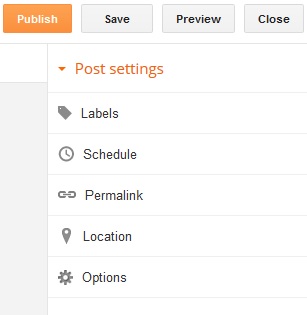
 Post Settings:

How to Create High Quality Blog Web Site Blogger Google Home Page

 - Labels: Can add keywords to each post you create. It'll be at the bottom of each post and can inform visitors about the subject.
 - Schedule: Allows you to set the time and date of each page or article you create. So if you want to reposition a post which no longer appears on the home page, changing the date you made back on timeline.
 - Permalink: This is the URL of your page or post, as it'll appear on the internet. This allows you to quickly obtain the link to your post or your page then share or invite people to visit, without going through the visual.
 - Location: If you create a post or a page with an event location and time, it is possible to indicate the geographical locality.
 - Options: To allow or not allow, show or no reader comments.

How to use a custom domain name for my blog?

 yournewblog1.com without ''Blogspot'' ! Having your own domain name allows you to:
 - Have a shorter address: tellmh.blogspot.com > tellmh.com
 - Better retained.
 - More professional and more credible, thus more successful !

 Before you move your blog to a custom domain, you need to have already purchased a custom domain from another provider. There are many companies you can buy domain names from, but i suggest you:

 * Hostgator (5.99$ / year) or email me from HERE to get an Exclusive offer of 0.99$ / year !

How to Create High Quality Blog Web Site Blogger Google Home Page


 * Godaddy (8.99$ / year) or email me from HERE to get an Exclusive offer of 0.99$ / year !

https://godaddy.com/domains/domain-name-search.aspx

 After you've purchased your custom domain, follow the steps below (as described by Google):
  1. Go to your blog and click on Basics under the Settings tab. In the "Publishing" section, click the link to add a custom domain.

    How to Create High Quality Blog website Using Blogger blogspot custom domain

     
  2. Type the url of the domain you've purchased, keeping in mind that it must begin with www in order to work.
  3. Click Save.
  4. You should see an error, and two CNAMEs listed below. Each CNAME is composed of two parts - Name, Label or Host and Destination, Target or Points to. The first CNAME is the same for everyone, Name being "www" and Destination "ghs.google.com." The second CNAME is particular to your blog and your Google Account, and is therefore different for each person.
  5. Go to your domain registrar's website and locate the DNS (Domain Name System) settings in the control panel.
  6. Now it's time to enter the CNAMEs. Where it says Name, Label or Host simply enter "www" and list ghs.google.com as the Destination, Target or Points to.
  7. Now enter the second CNAME in the same way.
  8. Optional: You can also enter A-records, which links your naked domain (example.com) to an actual site (www.example.com). If you skip this step, visitors who leave off the "www" will see an error page.
  9. Optional continued: After completing Step 8, enter your domain name in the format example.com, and list the I.P. addresses shown below in the "A" section. You'll need to create four separate A-records which point to four different Google IPs. 216.239.32.21
    216.239.34.21
    216.239.36.21
    216.239.38.21

    End of optional section

  10. Before you move onto the final step, wait about an hour for your DNS settings to activate. If you attempt the final step before your settings are activated, we'll let you know with a warning message.
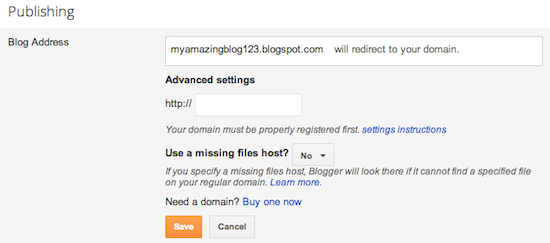
  11. After your settings have been activated, you need to make sure Blogger knows about your custom domain so that Google can direct readers to your blog. Just head back to Blogger and update the information on your Settings | Basic tab. Find the area for "Publishing," and click the link to add a custom domain.
     
    How to Create High Quality Blog website Using Blogger blogspot custom domain
    Enter in the URL for your custom domain in the text box provided, and click Save.
    How to Create High Quality Blog website Using Blogger blogspot custom domain
      That’s it! Your blogspot.com address will soon redirect to your new custom domain -- be patient, as it might take up to 24 hours for the redirect to start working. If you're still seeing an error after 24 hours, it means your settings weren't entered correctly and you should try the process a second time.
Some helpful notes:
  • If your new domain isn't taking you to your blog, wait another day or two to make sure all the DNS servers have been updated. If it still isn't working, contact your registrar to make sure you entered the DNS settings correctly.
  • Your original Blogspot address will automatically forward to your new domain. That way, any existing links or bookmarks to your site will still work.
  • Your posted images will continue to display on your blog.

 How to Design and Customize Your Blog:

 Designing a complete blog template is not an easy task, you'll need hight HTML and CSS skills! If you are unfamiliar with HTML and CSS or just wish to save your time, there's a very large high quality Blog templates on CodeCanyon.com (starting from 2 $US only!)

http://themeforest.net/user/drsanfour/portfolio?ref=DrSanfour


 - Now that you have found your new template for your blog, just follow these few steps to install it in your blog, it does not take more than a minute.
 - Go on your Blog Dashboard: > Templates > Backup / Restore

How to Create High Quality Blog website Blogger blogspot (FULL TUTORIAL)
 - Click "Browse" button, a window will allow you to search your template: Choose the file that contains your template, the XML file. Double-click it and click on the orange button "Upload":

How to Create High Quality Blog website Blogger blogspot (FULL TUTORIAL)

 How to start making money with your Blog:

 Now let's take a look at top tools to make money with your blog, several sources of income exist and you can earn from few cents to several hundred dollars depending on your Blog traffic !

 1. Advertising:

 Contextual ads or banners appear in your content. You will be paid per click or number of views. The easiest way for a blogger is to install Google AdSense.
 What can you earn with AdSense? For a blog with about 1,000 page views per day, you can reach daily revenues of 1 to 3 $US.

 If you can't get AdSense approval (for many reasons) you can try one of the best Google adsense alternative: RevenueHits , instant approval and an highest eCPM program!


 2. Affiliation:

 If traffic to your blog is very important, you can use Affiliate links . Receive a commission on sales made through a link on your site.
 Learn about it on How to Make Money Using Affiliate Marketing on your Blog

 We're done here, you can start the experience and share it with us! Don't hesitate to ask questions on comments below :)

Tips to Increase The Reach of Social Media Posts


 It’s becoming harder and harder to make the voice of your business heard across social media, not because your message is any less valuable but due to the sheer surge in popularity of platforms like Facebook and Twitter.

 Combined with the noise and shift of such platforms to drive more paid posts, promotions and ads, organic reach – the kind you get from simply posting something to your page and waiting for your fans to see it – has inevitably dropped. Now that users have more to filter, they equally have a lower tolerance for doing that and the social networks know it.

 There are many factors that combine to make for a popular post. Depending on your business culture and the type of audience you’re trying to attract, some factors will be more valuable than others. Even so, it still makes sense to understand all of the potential plays you can make.

 Experimenting with your social media marketing posts helps you to see what your audience responds to and what puts them off your page. Over time this means you can craft just the right mix to perfect your posts. 


how to increase reach of facebook twitter posts for your business

Improve Your Facebook Posts:

 - Light-hearted content geared towards entertainment value.
 - Strong visuals attract more attention. Memes can work well but need to be relevant, not just jumping on the bandwagon.
 - Topical posts that relate what you do to current events or seasonality.
 - Special offers, contests, or anything that casts your product/service in the light of saving page fans time and money.

Improve Your Twitter Posts: On Twitter, things are a little different. Think about these elements to craft the perfect Twitter post:

 - Brief, to the point posts make most sense and attract more attention. Cluttering up your 140 characters is a sure fire way to have people ignore you.
 - Tantalizing headlines should be used when you want to drive clicks to your site. Think like a newspaper editor!
 - Hashtags make your message more visible but should be used sparingly. One or two per tweet is enough.
 - Quotes and one-liners can work well.
 - Images can help to increase engagement but should be used in their own right (where the image is the point of the post, not an addition).
 - Repetition is okay. Tweets are a drop in the ocean and easy to miss, so it’s worth posting the same piece again a few hours later to help followers catch it. Varying the content of your tweet will help to make your feed more interesting, however, even when you’re communicating the same link or idea.
 More on: How to get more followers on Twitter

 On both social networks, the timing of your posts is also vital. Knowing when fans will be around to view your content helps more people to catch it early on, driving the likes and shares that increase your reach. Again, you can test out posting at different times to see what works best for your business page.
 Another quality that works well on both platforms is supporting a cause. If something you post, be it an offer or just a link to an article, supports a non-profit or some other selfless effort, fans will see that your page is about more than just selling them something.

 Factor in as many of these ideas as you can for your posts across these two prominent platforms to ensure that you keep your social media fans and followers coming back for more. Once you hone your social media strategy, you can integrate other marketing tools to make your brand more memorable online like using a Vanity Phone Number (a mixture of numbers and letters designed to make your company’s marketing more memorable).

Get Your Own Vanity Phone Number Today at RingBoost.com. It will bring in more clients, are cost effective, stand out from the competition, and are exclusive.

 How Vanity Numbers Work?

 Custom phone numbers are important to a business because they tend to generate a higher response rate from potential customers. More calls means more sales, so a business without a vanity phone number is missing an important page in the marketing playbook. A descriptive word is usually integrated into the number to explain what you do or how you improve business for customers. For example the number: 1-999-TOLL-FREE ; keeps the theme of your business front and center, while offering potential customers an easy way to remember who to call.
 Toll-Free Numbers give potential customers an extra reason to call you over your competitors.
 A vanity number is more than just contact information, it is a business marketing tool that provides your company with a unique competitive advantage.
 See also: How to make free calls via Skype
 You need a phone number that customers will remember? Tellmh.com offers 5% off purchased made at RingBoost by using coupon code: ringboost5off  (expiration date 04/29/2018)
 NB: This discount is exclusive and is not found anywhere else on the Internet!


Get A Vanity Phone Number

 Be Remembered, a memorable number means more calls. More calls? More leads! Share the post if you like it :)

Surfing on the Web: Fast tips for better use


  •  Tabs: display multiple pages at the same time:

 Sometimes, we need to view multiple internet pages simultaneously. To avoid goings and comings between sites, a trick allows you to open them simultaneously. So you can move from one page to another with a single click.

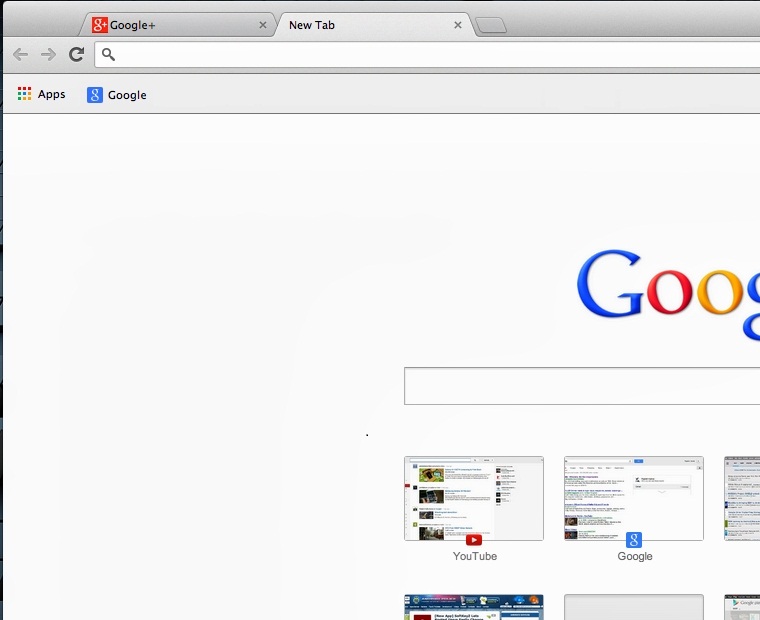
 When you open a page in Google Chrome for eg, its name appears in a tab above the address field. To open a second page, click the small button on the right after this first tab.

Surfing on the Web: Fast tips for better use

 A second tab called "New Tab" is displayed next to the original tab. And at the center of the window, a white page with thumbnail (s) for different web pages that you have visited several times in the last days. If the page where you want to go is listed, click on its thumbnail; otherwise, enter its address in the address search-bar area and press Enter.

Surfing on the Web: Fast tips for better use

 The second page displays, but the first tab is always there, so you can switch between the two pages by clicking on the respective tab. And nothing prevents you from viewing a third page by repeating the first two steps.

  •  Re-open accidentally closed tab:

 When surfing the internet, it can happen that you accidentally close a tab by pressing the small cross at the top right of the web page. To find the Internet tab closed, here's a tip:
 1. Press " Ctrl " and " Shift " and the letter " T " at the same time.
 2. The last closed page will reopen to the right of the page you're currently viewing.
 3. If this does not open the desired tab, then repeat the operation several times. All pages previously closed will open one after the other in chronological order of their closure.

  •  Search for a word in a web page or a text document:

 Using a simple keyboard shortcut, you can quickly find a word, name or phrase ... in your text documents, or on a web page.
 Do you know the keyboard shortcut "Ctrl + F" for PC and "Apple + F" for Mac? This shortcut will save much time avoiding you browse all the pages of a text document or web in search of a word or phrase.
 1. When both keys "Ctrl" and "F" (for PC) or "Apple" and "F" (for Mac) are pressed together, a window appears at the top right of your screen.
 2. Type in the word you searching for.
 3. The desired word then appears highlighted in your page.
 4. To switch to the next found word, press the Enter key (or click on "next" or use the arrows for some versions of Windows).
 This shortcut is universal: it works for all programs: web page text document, PDF...

  •  Take a Screenshot:

 The screen shows something amazing? Photograph it!
 No need for a camera, just press the Print Screen key. Then go to Start > Programs > All Programs > Accessories, then click Paint. Pull down Edit menu then click Paste.
 The photo appears. You can save it.

  •  Add favorites to your browser:

 You often visit the same websites that are your favorites. You can make them quickly accessible from your web browser. Your favorite sites can be accessed directly from the Favorites bar of your browser.
 - Go first to your favorite site and grab the icon on the left of the URL with your mouse and drag it by sliding it under the URL box of the navigation window. Do the same with all your favorite sites.  You can then click on it directly without going through a menu or typing the URL.
 - The name that registers is often too long and occupies too much space in the Favorites bar; it is preferable to shorten it. To do this, right click on the name, click Edit, or Properties (depending on the browser) and then Rename.

  •  Hide the screen very quickly !

 Someone enters the room and you want to hide your computer screen? A keyboard shortcut allows you to do this!
 Simultaneously press the '' Windows '' key and '' D '' and all the windows disappear. To find them, press the same key combination.
Note: Here's the Windows Key:
Surfing on the Web: Fast tips for better use


 Have questions or tips to add? Comment below :)

How to use OneDrive


Why to use OneDrive?

 - Access your files (photos, documents, ...) and share them with whoever you want, wherever you are! Pictures, documents and other important files available on your phone, tablet, PC or Mac.

 - Store your data in the cloud up to 15 Giga for free; and up to 200 paid gigabytes.

 - Synchronize files between your PCs, phones, tablets...

 - Enjoy free Word, Excel, PowerPoint and OneNote in your browser with OneDrive and Office Web Apps. Different people in different locations can work on the same document at the same time.

 - Only share the documents you want with the people of your choice and set others to remain confidential.

 - Also, if you run Windows 8 and are connected to a Microsoft account, you can view all your files and pictures, edit, and share Office documents with people you choose. Better yet, your background and your settings move with you.


 Create / Use an account

 - Go to OneDrive.
 - Enter to your account (or create a new one).
Note: If you have a Hotmail account, Microsoft or Live, you can use it directly without having to create a new account.
 - OneDrive displays your files (documents, images, Public):

 - By clicking the button on the right of OneDrive as shown in the picture below, you will be able to manage your contacts, your calendar, your mail and many more:

 - By clicking on the Create tab you can create various documents (Word, Excel, PowerPoint ...):


 - The Upload tab is used to transfer files from your computer to onedrive:


 The onedrive Settings

 By clicking on the gear wheel at the top and right you arrive in onedrive options allowing you to increase the storage capacity, modify sharing settings, select the default format for office documents.


 The account

 By clicking on your username you can log out, change the settings of your account, your profile, be visible or hidden.


Enjoy :)

Identify whether a website is reliable


 Many people wonder if a particular site is reliable or not. These are usually shopping sites that offer very large discounts on expensive products in normal times.
 There are several methods to determine the credibility of a website.


Using WOT

Install WOT!
 This little add-on for browsers provide you with an estimate of Internet users for each site you visit and thus determine its commercial credibility.
 You can install WOT from its official site.

 Visual methods

 Terms of use or sale:
 Websites usually have "Terms of use", especially shopping sites, which have "Sales Terms". They are at the bottom of the page, and provide information on prices, deliveries, and products origin...

 Legal Notice:
 "The editor of a website, the author of a blog or an online shopping store shall display legal notices on its website. This is a legal requirement worldide.
 A site with no imprint is illegal.

 Site security:
 Most reputable shopping sites have, during the transaction, the architecture https://, which defines payment security.
 The https is not obtained anyhow, so it is a valuable warranty in orders. You can see if the site is https in the web browser address bar:


 Attention: A site displaying https:// is not necessarily reliable. But, a site that will not display during a transaction will be considered as unreliable.

 Orthography:
 A site full of mistakes is invalid. Serious sites make no mistake.

 Presentation:
 If the Web site is disorganized (not centered pictures, overflowing text, unrecognized characters...), it is certain that it's not reliable.
 Fraudulent sites generally follow the same format: all their products on the left, top bars and all brands are in bottom.

 Redirects:
 It is not rare that an unreliable website redirects you to sites in China, North Korea, or other "world workshop". So you can be sure that this site has no value and that you will leave your money there!

 Discounts and Products:
 If discounts of a site are all the same (generally 60%: it is just above 50% to be attractive and just below 70% to not look suspicious), it's a bad sign.

 Whois

 Whois is used to find information on the site, such as, country, administrator contact information...
 A commercial site in Spain domiciled in China for example, means most probably forgeries or a scam.
 Just go to network-tools and on the left menu, select Whois, enter the address and click go! :


 An example of infringement:
 Registrant Country: SP
 Admin Name : xx

 Registrant:
 Organization   : zhao chun ...
 Name           : zhao chun ...
 Address        : li xia ...
 City           : ji nan shi
 Province/State : Shandong
 Country        : CN
 Postal Code    : 250000
 We see clearly that the country (CN) is China, with the person's name.
 It's the same as sites with contact details "Anonymous" can not be of trusted.

 BE CAREFUL! Do not throw headlong on discounts... because it's often forgery, which is punishable by law.

How to get more followers on Twitter


 "Tweet" as part of his professional activity, is good ... Without a solid base of subscribers with whom to interact, share links, tips, promotions or other, animate a Twitter account is a time-consuming exercise, few profitable and fast-motivating hence the importance of reflecting, when you register at an effective strategy to rapidly increase your number of followers. Having clearly identified the goals of your presence on Twitter, various tools and techniques of communication-internes and external to plateforme- are available to encourage Twitter users following you. A necessary step to hope to become one day an "influential" user.

 Here are some golden rules, tips and best practices for improving your chances of being seen and followed on Twitter.


Improve its visibility on Twitter

 To encourage users to follow you, you must initially be identified by members as a relevant contributor. The first step is to clearly define your scope of action on the platform, and what you will bring to concrete. Only after this period of reflection that you can use the tools provided by Twitter to promote your profile.

Define "editorial line" for his profile:

 Twitter users generally follow patterns that match their interests. As a content producer, you are both "editor" and "chief editor" of your own communication space. For reasons of clarity and coherence, so you will have to define the editorial line, which will allow users to better identify you, and encourage them to follow you.
 A series of questions can help you set this policy:

 - On what I want to share content on Twitter (individual, independent professional, working group, project, business, website)?
 - In what area of ​​expertise I am more legitimate to express myself?
 - What are the objectives of my presence on Twitter: development of my personal brand, job search, B2B-B2C marketing, customer relationship?

Effectively acquaint their profile, customize his Twitter page:

 Twitter offers a presentation field (bio) in the form of a mini jack, allowing you to present to the community. This is an important commitment factor with potential followers.
- Indicate precisely who you are and on what topic you tweet exactly
- Add a URL in the appropriate field, depending on your communication objective (website, LinkedIn profile, personal blog, etc.)
- Add a photo: members adding a photo to their profile are much followed that members without photo.
- Localize
- Customize the background theme of your Twitter page (you can add a custom image on which you take the opportunity to share messages or slogans)

Use Twitter to recruit followers:

 Once your "identity" created and your editorial framework in place, you must follow a few golden rules to improve the visibility of your tweets, and encourage members to follow you:

 - Tweets frequencies is essential to hope to increase its base of followers. Set a daily goal of publications (between 5 and 10 is a minimum)
 - Use the Mention function (@xxxxx): it allows to interpellate a member (the equivalent of a Poke on Facebook) to engage in conversation and thus customize your relationship to the community. For example, to start a debate, greet interesting content produced by the person concerned, etc.
 - The ReTweet (RT): This feature, which allows a person to notify you recommended his tweet, should be used parsimoniously. If you use it too frequently (more than one tweet three), the risk of being perceived as a user who "produce" the content of its own. Use it with influential members (who have many followers) to make yourself visible to them.
 - HashTags (#): The keywords are important on Twitter, as these are significant standby criteria for many users. In the composition of a tweet, it is not always possible to indicate the concept / the general theme to which it relates. Consider using #Keyword function to promote your tweet, by including it in a thematic area (eg #marketing).
 - If your business allows, why not take pictures (eg products) and share them on the hosting platform of photos / videos Twitpic, knowing that there are many fast-sharing services (via smarpthone in particular)
 - Start competition events (eg product offering) rewarding one of your new subscribers for the duration of it.
 - Create lists: Twitter allows you to create following thematic lists. If you follow the accounts dedicated to your industry on one side and on management techniques on the other, you can create two differentiated lists. Not only will you organize your 'watchfulness' but in addition, each account you add to a list receives a notification. A good opportunity to get noticed by him and possibly be followed.
 - Managing tweet frequencies: Twitter recommends three to four tweets a day to maximize its commitment rate and thus maximize its chances of winning followers.
 - Analyze its Twitter traffic: Since July 2014, Twitter offers its analytics service. Consult and analyze your content manager allows more precisely identify successful tweets, the rate of commitment and demographics of your followers.

Recruit followers via external media and platforms

 Several tips are used to recruit followers "passively", outside the context of use of the service.
 Some possible solutions:

 - Add your Twitter user name (URL) on various social media and content sharing platforms where you are present (eg LinkedIn, Facebook, Digg, Slideshare, Scribd).
 - Add your Twitter user name to sign your professional email address, but also "physical" communication media (eg business card, etc.)
 - If you distribute a press release for the launch of a Job or event: incorporate a pre-written tweet template (to copy and paste) quoting your Twitter account, with a share link.
 - Embed a badge / button / Twitter widget to your blog / website.
 - Indicate on your website / blog that you "follow back" your new subscribers, on the principle of reciprocity.
 - Sign up for different Twitter profiles SEO directories. They allow you to appear in thematic lists or categories viewed by other members seeking Twitter profiles to follow. These include: Twellow, WeFollow, Listorious, Twibes, Tweetfind, etc.
 - Some Twitter members "automatically follow back" if you subscribe to their account. Although this method seems somewhat artificial, it can quickly increase its number of subscribers at the beginning, knowing that your number of followers is an important argument to encourage other users to follow you.
 - Buying followers: Not recommended ! It is possible to buy a large volume of Twitter followers. It is not advisable to practice this artificial inflation of figures. Reassuring in the moment, but risky in the long term. Indeed, the accounts are usually fake without real people behind. A quick scan can easily detect them (these fake accounts have no followers, never tweeting). This practice is likely to dent your online reputation.

 Good luck ! :)

How to disable (bypass) internet access restrictions for free


 If you want to access content that are blocked in your country, here is a new extension for Firefox, Chrome and Opera called Zapyo. It allows to connect to your favorite websites via a bunch of proxy servers located around the world. The world wide web was designed to be accessed by everyone, without restrictions!


 Zapyo is FREE and targets people who use web TV but you can of course use it for any web site, to make it believe that you are in Australia, the US, China, Canada, Germany, Italy, Spain and more other countries!

 - Go to: Zapyo.com

 - Click on Get Zapyo Now

 - Register for FREE then click the Zapyo Icon and select the country you want to use!


 - Test your new location informations using whatismyipaddress.com !

 N.B: Zapyo is not an anonymizing tool. You will need to register to use it. But you will no longer be a slave to geolocated censorship practices.

 Have fun and share the post with your friends!

Refine and certify your computing skills Online


 Do you want to learn new skills? Do you wish to enter the growing mobile and computer industries? And even earn a Verified Certificate in these areas?

 I'm providing in this post a collection of high-quality courses and online classes to develop computing skills and/or to provide a solid foundation for future studies in Computer Science!

learn certify programming skills online

 In the world today, the ability to think computationally and program effectively are tangible skills that can differentiate a jobseeker from their competitors. For technical disciplines, these skills are immensely useful and a requirement in many areas. This series is designed to give you those skills.

 Programming for all! (Python)

learn certify programming skills online
 This course aims to teach everyone to learn the basics of programming computers using Python. The course has no pre-requisites and avoids all but the simplest mathematics. Anyone with moderate computer experience should be able to master the materials in this course. Learn more and get the course from here.

 CS For All: Introduction to Computer Science and Python Programming

 This computer science course provides an introduction to computer science that’s both challenging and fun. It takes a broad look at the field of computer science through a variety of demonstrations and projects. It will cover both low- and high-level concepts, from how the circuits inside a computer represent data to how to design algorithms, as well as how all of this information affects the technology we use today. Additionally, it will teach the basics of Python programming, giving a way to put your new CS knowledge into practice. No need to know any programming before starting the course; you’ll teach everything you need to know along the way. All you need to start is a good grasp of algebra, and you can fall in love with both the concepts and the practice of computer science. Start from here.

 Interactive computer graphics with WebGL

 learn certify programming skills online
 Applications of computer graphics are ubiquitous, ranging from animations in movies to computer aided design of mechanical parts. In this course, you will learn how to create three-dimensional interactive applications using WebGL that run within the latest web browsers. You'll find open discussions about all aspects of computer graphics from hardware to software to applications. Here where you can start with this Course.

 The illustrated networks: principles without calculation

 This course serves as an introduction to the basic principles that govern all aspects of our networked lives. You will learn about companies like Google and technologies like the Internet in a way that requires no mathematics beyond basic algebra. Join for free here.

 Programming Mobile Applications for Android Handheld Systems:

learn certify programming skills online
 Google’s Android OS runs 81% of smartphones worldwide and has shipped over one billion units this past year alone. Meanwhile, the search for talented Android developers continues, making it one of the most in-demand software development skills today.
 This course introduces you to the design and implementation of Android applications for mobile devices. You will develop an app from scratch, assuming a basic knowledge of Java, and learn how to set up Android Studio, work with various Activities and create simple user interfaces to make your apps run smoothly. If you want to learn Android app development, and have a background in Java, this course then is for you! Course Part 1 / Course Part 2.

 Programming Cloud Services for Android Handheld Systems: Spring

learn certify programming skills online
 In this course you'll learn how to connect Android mobile devices to cloud computing and data storage resources, essentially turning a device into an extension of powerful cloud-based services on popular cloud computing platforms, such as Google App Engine and Amazon EC2. Engage from here.

Read:  EXCLUSIVE ! Make a QUIZ application for Android


 Web Technologies:

learn certify programming skills online
 WWW, the world wide web or shortly the web - really nothing more than an information service on the Internet – has changed our world by creating a whole new digital world that is closely intertwined with our real world, making reality what was previously unimaginable: communication across the world in seconds, watching movies on a smartphone, playing games or looking at photos with remote partners in distant continents, shopping or banking from your couch… In this MOOC on web technologies you will learn how it all works. Enroll for this course that will start in just two days from here!

 A selection of other free courses you may like:

 Introduction to Cloud Computing: Develop an understanding of the economics and architecture of various cloud computing models.
 Introduction to Computer Programming, Part 1: This nine-week course provides students with a foundation in Computer Programming.
 Building Cloud Apps with Microsoft Azure: Learn to build real-world cloud solutions from Microsoft experts.
 Begin Programming: Build Your First Mobile Game: Learn basic Java programming by developing a simple mobile game that you can run on your computer, Android phone, or tablet.
 Exploitation de text et analytique: Explore algorithms for mining and analyzing big text data to discover interesting patterns, extract useful knowledge, and support decision making.
 Introduction to Genomic Technologies: The basic biology of modern genomics and the experimental tools used for measurement. This is the first course in the Genomic Big Data Science Specialization.

 Comment & share the post :)